

Environmental Monitoring Programme Tool
Build your environmental monitoring risk assessment in the ASC RA19 structure, log every swab result, have positives emailed to your team as soon as they are saved, see the trend by zone, and get a reminder before each annual review is due. It runs in your browser on ascfoodsafety.com, with nothing to install, and exports the full Excel workbook for the audit file.
R1 450 per site per year
about USD 89 · EUR 77 · GBP 66 · AED 326. No VAT is charged. Renewable at the same price.
Pay by card, Instant EFT, SnapScan or Zapper through PayFast. International cards are charged the rand amount at your bank’s rate.
What an auditor asks, and what the tool shows
FSSC 22000 clause 2.5.7 asks for four things: a risk based environmental monitoring programme, a documented procedure, trend analysis of the results, and a review of the programme at least annually and whenever one of five triggers occurs. BRCGS Food Safety Issue 9 clause 4.11.8, SQF Edition 9 clause 2.4.8 and IFS Food Version 8 clause 5.6.2 ask the same questions in their own words (SQF Edition 10 audits are expected from 2 January 2027). Most sites have the swab list. Far fewer can show the reasoning behind it, the trend, and the review. That is what this tool keeps in one place.
| The question | Where the answer lives in the tool |
|---|---|
| Why these sites, organisms and frequencies? | The risk register in the RA19 structure: one line per zone, site and organism, scored before and after controls, with the organism justification written for each line. The residual score sets the frequency. |
| When and how are samples taken, and what are they tested for? | The four week schedule matrix with shift and day rotation and the weekly swab budget; targets, methods and sampling time per zone; the neutralising broth matched to the sanitiser in each area; the laboratory and its methods. |
| What happens when a result fails? | Alert, action and escalation levels with the response to each, the hold and release rules, the positive drill with vector (star burst) sampling, root cause and corrective and preventive actions, and the action tracker. |
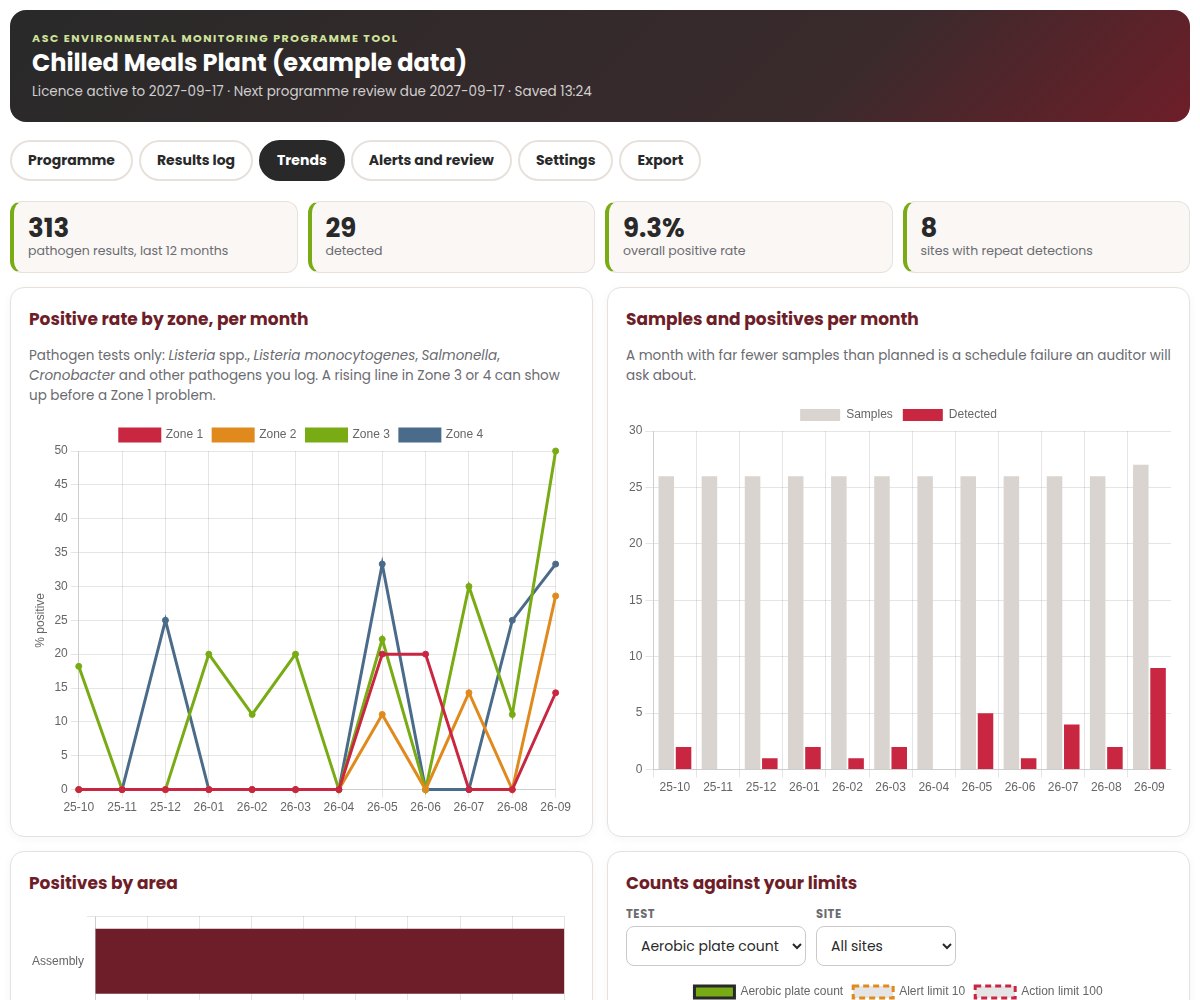
| Show me the results and the trend. | The results log, every sample with its date, site, zone, test, result and laboratory reference, and the trend charts: positive rate by zone per month, samples and positives per month, positives by area, repeat sites and counts against your limits. |
| When was the programme last reviewed, and why? | The review log for the annual review and the five triggers, the reminder before the annual review is due, and the automatic flags for repeat detections and for long runs without a positive. |
What you get
Programme builder
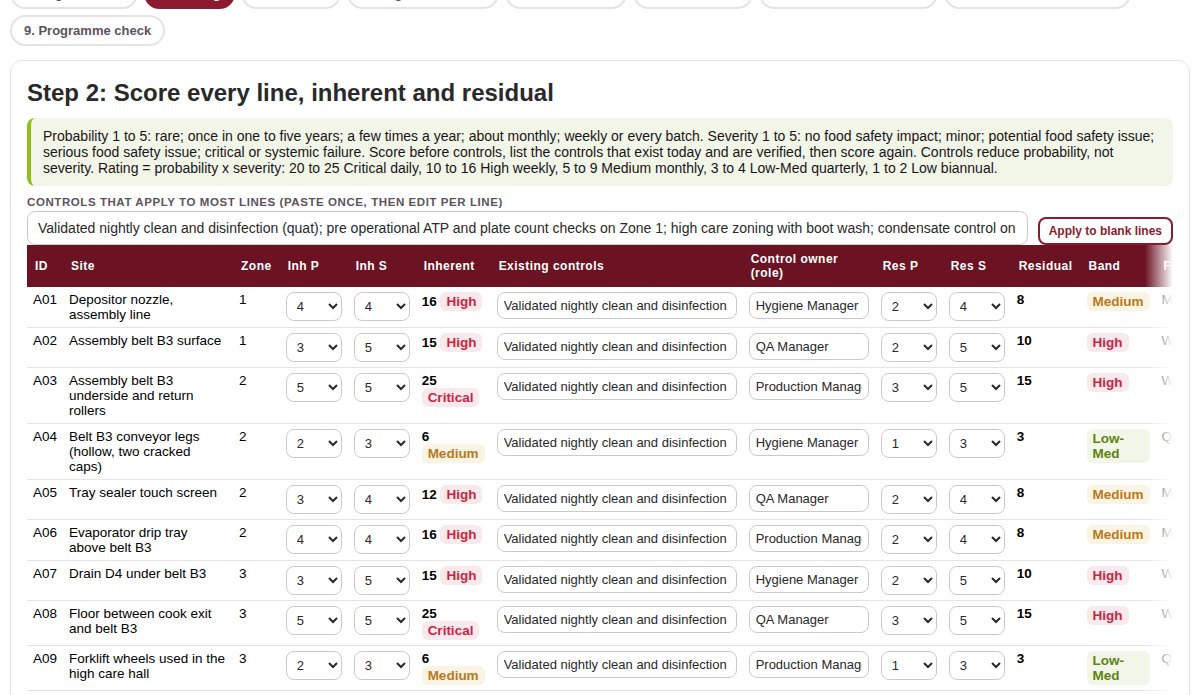
Nine sittings: register lines, scoring, schedule, targets and broth, action levels, positive drill, root cause and CAPA, action tracker and note to management, and a programme check that lists what an auditor is likely to question. Three example sites, a chilled ready meals plant, a citrus packhouse and a restaurant kitchen, show what a finished programme looks like. Everything saves to your workspace as you work.
Results log
Log a result in a few seconds: choose the site from your register and the zone and area fill in. Paste a batch straight from a spreadsheet or a laboratory report. Filter by date, zone, test or result, and see every flagged result highlighted.
Positive result alerts
Every result is graded as it is saved. A pathogen detected on Zone 1 is an Action for Listeria spp. and an Escalation for Listeria monocytogenes, Salmonella or Cronobacter. Zone 2 detections are Actions and Zone 3 and 4 detections are Alerts. A repeat at the same site within 12 months moves up one level. Counts are compared with your site’s own alert and action limits. Flagged results go by email, as soon as they are saved, to up to ten addresses you choose.
Trend charts
Positive rate by zone per month, samples and positives per month, positives by area, a repeat site list, a heat map by area and month, and count results plotted against your alert and action limits. The picture you need for the monthly review and for the auditor.
Review triggers
An email reminder 30 days before the annual review is due, and monthly while it is overdue. Automatic flags when a pathogen is detected again at the same site within 12 months, and when there have been no pathogen positives over an extended period (six months and at least 20 results by default, both adjustable). Both are review triggers under FSSC 22000 clause 2.5.7 (d). A review log for every annual and trigger review, with who reviewed, what changed and who approved.
The RA19 style workbook
One click exports How to Use, Programme Design, Risk Register, Matrices, Action Tracker, Review Log, Schedule, Targets and methods, Action levels, Positive drill and CAPA, Results Log and Trend Summary as one Excel file. Download it or email it to your team from the tool.
See it before you buy

How results are graded
The tool grades each result against a simple, conservative rule set, and you write the response to each level in step 5 of your programme. Your food safety team always makes the product decision.
| Result | Alert | Action | Escalation |
|---|---|---|---|
| Pathogen detected, Zone 1 (food contact) | Listeria spp. or another pathogen you log | Listeria monocytogenes, Salmonella, Cronobacter, or any repeat within 12 months | |
| Pathogen detected, Zone 2 | First detection | Repeat at the same site within 12 months | |
| Pathogen detected, Zones 3 and 4 | First detection | Repeat at the same site within 12 months | |
| Count result (for example aerobic plate count, Enterobacteriaceae, ATP) | Above your alert limit | Above your action limit | |
| Any other test reported as detected (for example allergen protein) | First detection | Repeat at the same site within 12 months |
The aerobic plate count limits start at an alert above 10 and an action above 100 per cm2. The 100 per cm2 figure is the ceiling for food contact surfaces in regulation 6(4)(b) of R638 of 2018. Change both to the limits in your own programme in Settings.
How it works
Choose your licence
Tool, 12 month site licence
per site per year, about USD 89 · EUR 77 · GBP 66 · AED 326
- Programme builder, results log, alerts, trends, review triggers and workbook export
- No extra charge for results, reviews or exports
- Alert emails to up to ten addresses
- Renew at R1 450; renewing early adds 12 months to your end date
Tool plus onboarding call
first year, about USD 120 · EUR 104 · GBP 89 · AED 439
- Everything in the site licence
- A one hour online session with an ASC consultant to set up your workspace, review your register and agree your limits
- We email you after payment to book a time
- Renewal is the standard licence at R1 450
Prefer files, or want it built for you?
The RA19 Environmental Monitoring Risk Assessment is the same structure as editable Excel and Word files for R690 (about USD 42 · EUR 37 · GBP 31 · AED 155). The online EMP course trains the people who run the programme for R1 750 (about USD 108 · EUR 93 · GBP 80 · AED 394). Our EMP consultants design, fix and verify programmes on site.
EMP consultingOne licence covers one site. Buy one licence per site in the same order and each site gets its own workspace, register, results and alert list; the account holder switches between them from one login. If your account already holds a licence that has ended or ends within 60 days, a single licence you buy renews it; otherwise it opens a new site workspace. The licence holder can add team members, who log in with their own accounts, in Settings. Prices are in South African rand; the foreign currency figures are a guide only.
What the tool is not
It is not a laboratory information system: it does not order tests or receive results from your laboratory, and your laboratory’s report remains the record of the result. It does not certify your site or make the product release decision; your food safety team does, using the rules in your programme. It does not replace your cleaning, hygienic design or pest control. It keeps the programme, the results, the trend and the review together, and tells the right people quickly when something is found.
Want to compare it with a spreadsheet first? Read environmental monitoring software or a spreadsheet, and see what a full programme costs in our cost guide.
Frequently asked questions
What is the ASC Environmental Monitoring Programme Tool?
A browser based tool on ascfoodsafety.com that builds your environmental monitoring risk assessment in the ASC RA19 structure, logs every swab result, emails graded alerts when a positive or a high count is logged, charts the trend by zone, reminds you of the annual review, flags review triggers and exports the full RA19 style Excel workbook.
How much does it cost?
R1 450 per site per year (about USD 89 · EUR 77 · GBP 66 · AED 326), renewable at the same price. With a one hour onboarding call with an ASC consultant, the first year costs R1 950 (about USD 120 · EUR 104 · GBP 89 · AED 439). ASC does not charge VAT, and prices are charged in rand through PayFast.
Who receives the alerts?
Up to ten email addresses you enter in Settings, usually the QA manager, the technical manager and the site manager. The checkout email address is on the list until you change it. Flagged results are emailed as soon as they are saved, with the level, date, site, zone, test, result and laboratory reference, unless you switch alert emails off in Settings.
How does the tool decide whether a result is an alert, an action or an escalation?
A pathogen detected on a food contact surface is an Action for Listeria spp. and an Escalation for Listeria monocytogenes, Salmonella or Cronobacter. Zone 2 detections are Actions and Zone 3 and 4 detections are Alerts. A repeat at the same site within 12 months moves up one level. Counts are compared with the site’s own alert and action limits; the aerobic plate count limits start at an alert above 10 and an action above 100 per cm2, the R638 regulation 6(4)(b) ceiling, and you can change them. Your programme sets the response to each level.
Does it meet FSSC 22000 clause 2.5.7?
It gives you the evidence the clause asks for: the risk based programme, the documented method, the results with trend analysis, and the review record for the annual review and the five triggers. Whether your programme is adequate for your site is for your food safety team, and at audit your certification body, to judge.
Can we paste in results from a laboratory report?
Yes. Paste rows from a spreadsheet or laboratory report with the date, site code, test, result, unit, sampling time, laboratory reference and notes. The tool matches site codes to your register and fills in the zone and area.
What happens when the licence ends?
Your records stay readable, so the history is never lost, but you cannot add or change results until you renew. Renewing early adds 12 months to the current end date.
We have more than one site. How does that work?
Buy one licence per site, in the same order. Each site gets its own workspace, register, results and alert list, and the account holder switches between them from one login. If your account already holds a licence that has ended or ends within 60 days, a single licence you buy renews it; otherwise it opens a new site workspace. The licence holder can add team members, who log in with their own accounts, in Settings.
Is the RA19 template still worth buying?
If you prefer editable files, want the governing procedure as a Word document, or need to work offline, yes. RA19 costs R690 (about USD 42 · EUR 37 · GBP 31 · AED 155) and follows the same structure as the tool.
Have the programme, the results and the review in one place this week
R1 450 per site per year (about USD 89 · EUR 77 · GBP 66 · AED 326). Alert emails work from the first result you log, and the programme builds one sitting at a time.